

You're tired of monthly security system bills that never end. Subscription free security systems let you monitor your home without recurring fees, but choosing the right hardware, storage protocols, and automation logic requires understanding what you're actually giving up—and what you're gaining—when you eliminate that monthly charge.
What Is a Subscription-Free Security System?
A subscription-free security system records, stores, and alerts you to security events without requiring ongoing payments to a monitoring service or cloud storage provider. You own the hardware outright, and all data stays local—typically on microSD cards, local network-attached storage (NAS), or dedicated base station storage.

The key distinction: Traditional systems charge you monthly for cloud storage, professional monitoring, or both. Subscription-free systems handle everything locally. Your cameras record to SD cards or local drives. Your hub processes automations without cloud dependencies. Your alerts come through direct push notifications rather than third-party monitoring centers.
In my experience, most homeowners conflate "no subscription" with "no features," but that's increasingly inaccurate in 2026. Modern subscription free security systems support person detection, facial recognition, activity zones, and two-way audio—all processed locally on the device or hub. The limitation isn't capability; it's remote access and storage capacity.
Protocols matter significantly here. Zigbee and Z-Wave security devices operate on local mesh networks, eliminating internet dependency for core functions. Matter 1.4 devices can communicate across ecosystems while maintaining local control. Wi-Fi cameras, conversely, often require internet connectivity even for local recording—check manufacturer specs carefully.
Storage is your responsibility. A typical 1080p camera recording continuously consumes roughly 60-80 GB per day. At 256 GB, you get 3-4 days of footage before overwriting begins. Motion-only recording extends this to 2-3 weeks, depending on activity levels. Plan storage accordingly—running out means losing evidence when you need it most.
How It Works
Subscription-free security systems operate through three core components: sensors/cameras that detect events, local storage that retains footage and event logs, and a hub or base station that processes automation logic and sends alerts. Understanding how these interact determines system reliability and what happens during failures.
Event Detection and Recording Logic
When a sensor detects motion, door contact, or glass break, it triggers recording and alert logic:
IF motion_sensor.state == "detected" AND time >= user_defined_arm_schedule THEN
  trigger camera.record(duration=user_defined_length)
  trigger hub.send_push_notification(user_device_list)
  trigger local_storage.save_event_clip(timestamp, sensor_id, clip_file)
END IF
Latency expectations vary by protocol. Zigbee motion sensors typically trigger cameras within 200-400 milliseconds. Z-Wave sensors operate at similar speeds (250-500ms depending on network congestion). Wi-Fi cameras with built-in motion detection respond in 500ms-2 seconds, but this introduces internet dependency even for local recording in many models.
Thread-based sensors, increasingly common in 2026, deliver sub-200ms latency in optimized mesh networks, making them ideal for time-sensitive automations like triggering lights simultaneously with recording.
Storage Architecture and Retention
Local storage follows one of three models:
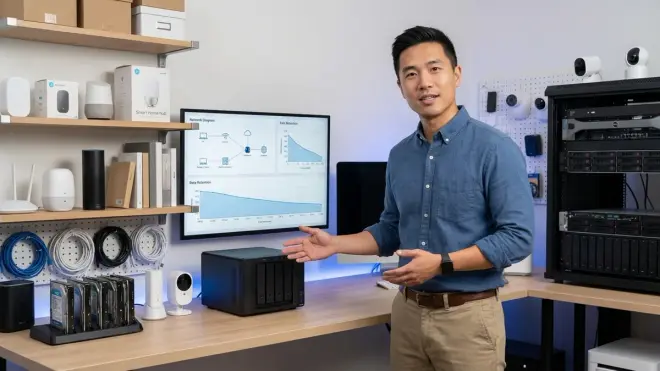
Per-device storage: Each camera contains its own microSD card (typically 64-512 GB). The Eufy Security SoloCam S340 uses this approach, with a 128 GB card providing approximately 2-3 weeks of motion-triggered footage at 2K resolution. Failure mode: if the camera is stolen or destroyed, footage is lost. If the card fails, you lose recording until replacement.
Centralized hub storage: Cameras and sensors transmit events to a base station with integrated storage (HDD or SSD). Hub processes all recordings centrally. Failure mode: hub failure stops all recording. Network congestion can cause dropped clips if multiple cameras trigger simultaneously and bandwidth is insufficient.
NAS integration: Cameras support ONVIF, RTSP, or proprietary protocols to stream directly to network-attached storage. You configure IP addresses, storage paths, and retention policies manually. Failure mode: network outages between camera and NAS stop recording. NAS drive failure loses all footage unless you implement RAID redundancy.
Overwrite behavior is critical. Most systems use circular buffers—oldest footage deletes automatically when storage fills. Some hubs let you flag "protected" clips that won't overwrite, but this accelerates storage depletion. I've seen homeowners lose critical footage because they didn't realize a week-old incident was already overwritten by newer motion events.
Alert Delivery Without Cloud Dependencies
Subscription-free doesn't mean notification-free, but the mechanism differs:
Local push notifications require your hub to communicate directly with your phone via local network or direct internet connection (not through manufacturer cloud servers). This works reliably on your home Wi-Fi but fails when you're away unless you configure:
- Port forwarding (opens your network to potential security risks if misconfigured)
- VPN access (secure but requires VPN setup on your phone and home network)
- Manufacturer peer-to-peer connection (some brands offer free P2P without cloud storage subscriptions)
Email/SMS alerts through local hub servers work if you configure SMTP settings, but many ISPs block outbound SMTP to prevent spam, making this unreliable.
In my experience, homeowners struggle most with remote access expectations. You'll receive alerts reliably when home. Remote alerts require technical setup that many manufacturers don't explain clearly in their documentation.
Why It Matters
The financial math is straightforward: a $20/month security subscription costs $2,400 over ten years. A subscription-free system with $1,200 in upfront hardware and occasional storage replacement ($100 every 3-4 years) totals roughly $1,500 over the same period—a $900 savings. But the real value goes beyond simple cost comparison.
You control your data entirely. No third-party company stores facial recognition profiles, activity patterns, or footage of your daily routines. No terms-of-service changes suddenly restrict features you relied on. No company goes out of business and bricks your system. This matters profoundly for privacy-conscious households, but it also means you're responsible for backup, redundancy, and security hardening.
Reliability shifts from cloud dependency to local infrastructure. Your internet can fail, and your system continues recording locally. Your camera manufacturer can discontinue support, and your system keeps working. But conversely, you lose remote access during internet outages unless you've configured VPN fallback. Your SD card can fail, and you're responsible for noticing and replacing it—there's no automated monitoring service alerting you to hardware failures.
Flexibility increases dramatically. You can integrate devices from multiple manufacturers as long as protocols align. A Zigbee motion sensor from one brand can trigger a Z-Wave lock from another through a compatible hub running automation logic you define. No subscription service constrains you to a walled ecosystem or charges extra for "premium" automation features.
I've consulted with homeowners who discovered too late that their subscription service charged additional fees to integrate third-party cameras, or limited automation rules to three unless they upgraded to a higher tier. Subscription-free systems eliminate these artificial constraints—the only limit is your hub's processing capacity and your willingness to configure logic manually.
The tradeoff is ongoing maintenance responsibility. You must monitor storage capacity, update firmware manually, test backup systems periodically, and troubleshoot failures without professional support. For technically comfortable homeowners, this is empowering. For others, it's a monthly source of anxiety.
Types & Variations
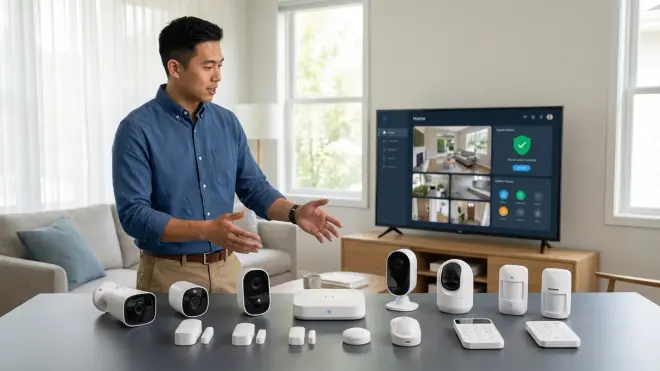
Subscription free security systems fall into four architectural categories, each with distinct protocol requirements and failure characteristics:
All-in-One Base Station Systems
A single hub contains camera inputs, local storage (typically 1-4 TB HDD), Zigbee/Z-Wave radios, and processing for up to 8-16 devices. Examples include hubs running proprietary firmware with dedicated companion apps. Protocol compatibility is critical—verify which wireless standards the base station supports before purchasing sensors. Some hubs support only proprietary sensors, eliminating third-party integration entirely.
Failure mode: Hub failure disables your entire system. Invest in a UPS (uninterruptible power supply) to maintain operation during power outages, or accept that security stops when power fails.
Distributed Camera Systems with Peer Storage
Each camera operates independently with its own storage, requiring no central hub. Management happens through a unified app that discovers cameras on your local network. Wi-Fi is the standard protocol, meaning internet outages may prevent camera access even though recording continues locally on SD cards.
Failure mode: Individual cameras fail independently without affecting others, but you lack centralized automation logic. You can't easily create "IF front door opens THEN record from driveway camera" automations without a hub intermediary.
Hub-Based Multi-Protocol Systems
Open-source or commercial hubs like Home Assistant, Hubitat, or SmartThings run automation logic and integrate devices across Zigbee, Z-Wave, Thread, Matter, and Wi-Fi. Cameras record locally via ONVIF/RTSP to NAS or attached USB storage. You configure all automation logic manually through if/then rules or scripting.
These systems offer maximum flexibility but require ongoing configuration. For guidance on comparing hubs and understanding protocol requirements, see our article on how to choose security systems with no monthly fee.
Failure mode: Hub failure stops automations but cameras continue independent recording. Network issues between hub and cameras break automation chains. You need fallback logic: "IF hub offline for 10 minutes THEN switch all cameras to continuous recording mode."
Hybrid Systems with Optional Subscriptions

Many manufacturers offer subscription-free operation with reduced features, then upsell premium subscriptions for extended storage, AI features, or professional monitoring. The Arlo Pro 5 records locally to a hub without subscription, but advanced person/package/pet detection requires Arlo Secure subscription.
This is not truly subscription-free if core features require payment. Read feature matrices carefully—some brands cripple local storage with 7-day caps or disable activity zones without subscriptions. I've seen homeowners purchase systems thinking they were subscription-free, only to discover that local storage maxes out at 1 GB without paying monthly.
Frequently Asked Questions
Can subscription-free security systems call the police during break-ins?
No, subscription free security systems don't include professional monitoring services that contact authorities on your behalf. You'll receive alerts directly to your phone, and you're responsible for calling emergency services if needed. Some systems support third-party professional monitoring services that charge per-incident fees (typically $2-5 per verified event) rather than monthly subscriptions, but this isn't truly subscription-free. If professional monitoring is critical for your household—perhaps you travel frequently or want backup when you're asleep—factor this into your decision. For more detail on alarm system options, check out our guide on how to set up a security alarm with no monthly fee.
Do subscription-free cameras work when the internet goes down?
Most do, but with significant limitations. Cameras with local SD card storage continue recording motion events even without internet connectivity. Hub-based systems recording to local NAS or base station storage also maintain recording functionality during internet outages. However, you lose remote access—you can't view live feeds or receive push notifications until connectivity restores. Wi-Fi cameras that rely on cloud authentication may fail to record entirely during internet outages, even though they have local storage—verify "offline recording" support explicitly before purchasing. For comprehensive protocol comparisons, see our smart home protocol compatibility guide.
How much storage do I need for a subscription-free security system?
Calculate based on camera count, resolution, recording mode, and desired retention period. A single 2K camera recording motion-triggered events captures approximately 2-4 GB per day in a moderately active area, meaning a 256 GB SD card retains 2-3 months of footage. Continuous recording consumes 60-80 GB daily for the same camera—requiring 1.8-2.4 TB monthly for a single camera. For a four-camera system recording motion only, budget 1 TB minimum for two weeks of retention, or 2-3 TB for a month. NAS-based systems benefit from expandable storage—start with 2-4 TB and add drives as needed. Our local storage vs cloud storage breakdown provides detailed capacity planning guidance.
Can I integrate subscription-free cameras with smart home automations?
Yes, if protocols align correctly. Cameras supporting ONVIF, RTSP, or native integrations with platforms like Home Assistant, Hubitat, or SmartThings trigger automations based on motion detection, person detection, or other AI events. Example automation logic: IF camera_front_door.person_detected == true AND time >= sunset THEN lights_porch.turn_on(brightness=100%, duration=10min). Zigbee and Z-Wave cameras integrate directly with compatible hubs. Wi-Fi-only cameras require webhooks, IFTTT, or manufacturer API support—check integration documentation before purchasing. Matter 1.4 doesn't yet include camera specifications as of early 2026, but manufacturer adoption is expanding. Thread-based sensors pair excellently with cameras for sub-second automation response times. For device compatibility verification, reference our Matter 1.4 compatibility checklist.
What happens to footage if someone steals my camera or base station?

If your camera uses per-device storage (SD card installed in the camera), theft means losing all footage stored locally. This is the single biggest vulnerability of distributed storage systems. Mitigation strategies include: (1) positioning cameras out of easy reach, (2) using tamper-resistant mounts, (3) configuring continuous upload to NAS so footage transfers off the camera within seconds of recording, or (4) using hub-based systems where footage transmits immediately to centralized storage. If someone steals your hub-based system's base station, you lose all stored footage unless you've configured automatic backup to secondary NAS or cloud storage (which may require paid services). For discreet placement strategies that reduce theft risk, see our guide on how to hide smart home devices without blocking wireless signals.
Summary
Subscription free security systems eliminate recurring fees by storing footage locally and processing automations on your own hardware, saving you thousands of dollars over system lifetime while giving you complete data control. You'll gain flexibility to mix protocols and devices without artificial ecosystem limitations, but you're responsible for storage management, firmware updates, and troubleshooting without professional support.
Understand exactly which protocols your hub supports before buying sensors. Calculate storage needs realistically based on camera count and retention expectations. Configure fallback behaviors for internet and power outages. Test your remote access setup while you're away from home—discovering your VPN doesn't work during an actual emergency is too late.
The technology works reliably in 2026 if you match components correctly and accept maintenance responsibility. If you want true set-and-forget operation with guaranteed remote access and professional monitoring, subscription services still serve that need. But if you're comfortable with basic network troubleshooting and want to eliminate perpetual monthly charges, subscription-free systems deliver genuine value without meaningful feature compromise. For comprehensive planning before purchase, review our complete checklist for building a no-fee home security system.
